
BACKER EMAIL
The Backer Email is the email associated with your Kickstarter account at the time of your pledge—specifically on September 1st, 2025.
If you used Apple’s “Hide My Email” feature when logging into Kickstarter, there is a high chance you did not receive the survey email. This feature generates a private relay email (usually a random string ending in @privaterelay.appleid.com) which forwards emails from Kickstarter, but also filters emails not directly from Kickstarter. Since our survey email was sent from outside Kickstarter, it may have been blocked.
If this applies to you: You must use that private relay email when filling out the “Backer Email” field below.
How to find the Apple relay email:
1. On an Apple iPhone/iPad/Mac,open Settings
2. Tap/click your Name
3. Tap/click iCloud
4. Tap/click Hide My Email
5. Find the address associated with your Kickstarter account
Enter that email in the Backer Email field.
If you changed your Kickstarter email after September 1st, you may need to enter the previous email, because that’s the one we imported into Hacksmith.store during the data migration from Kickstarter.
BACKER NUMBER
The Backer Number is the number assigned to your specific pledge to our project on Kickstarter. You can find it in your Kickstarter receipt, or inside your Kickstarter account.
On Desktop:
1. Log in to Kickstarter
2. Click your profile icon
3. Select Backed Projects
4. Locate the project in Active or Successful
5. Your Backer Number will appear in your pledge details

On the Mobile App:
1. Tap your profile icon
2. Select the project
3. Tap Manage

Other places to find it:
Search your inbox for a confirmation email such as: “We’ve collected your pledge for [Project Name]”
BACKER ID / KICKSTARTER ACCOUNT NUMBER
Your Backer ID (also called your Kickstarter Account Number) is a unique identifier assigned to your Kickstarter profile. It helps us securely confirm your pledge during the redemption process.
Kickstarter does not display this number anywhere in the app or in your account settings—it is only visible inside the URL of your Profile page when viewed in a web browser.
How to find your Backer ID / Kickstarter Account ID:
1. Open Kickstarter in a web browser
2. Log in
3. Click your profile icon
4. Click Profile
5. Look at the address bar (URL)
It will look like this:

The number after /profile/ in the URL is your Backer ID/Kickstarter Account Number
IF YOU HAVE A CUSTOM VANITY URL:
- Open Kickstarter in a web browser.
- Log in
- Click “Settings”
- Click “Edit Profile”
-
Under “Vanity URL” click “Reset”
- NOTE: This will temporarily disable your vanity URL. You can add it back later and based on our testing, if you put the same vanity URL, all your previously shared profile page links will work again.
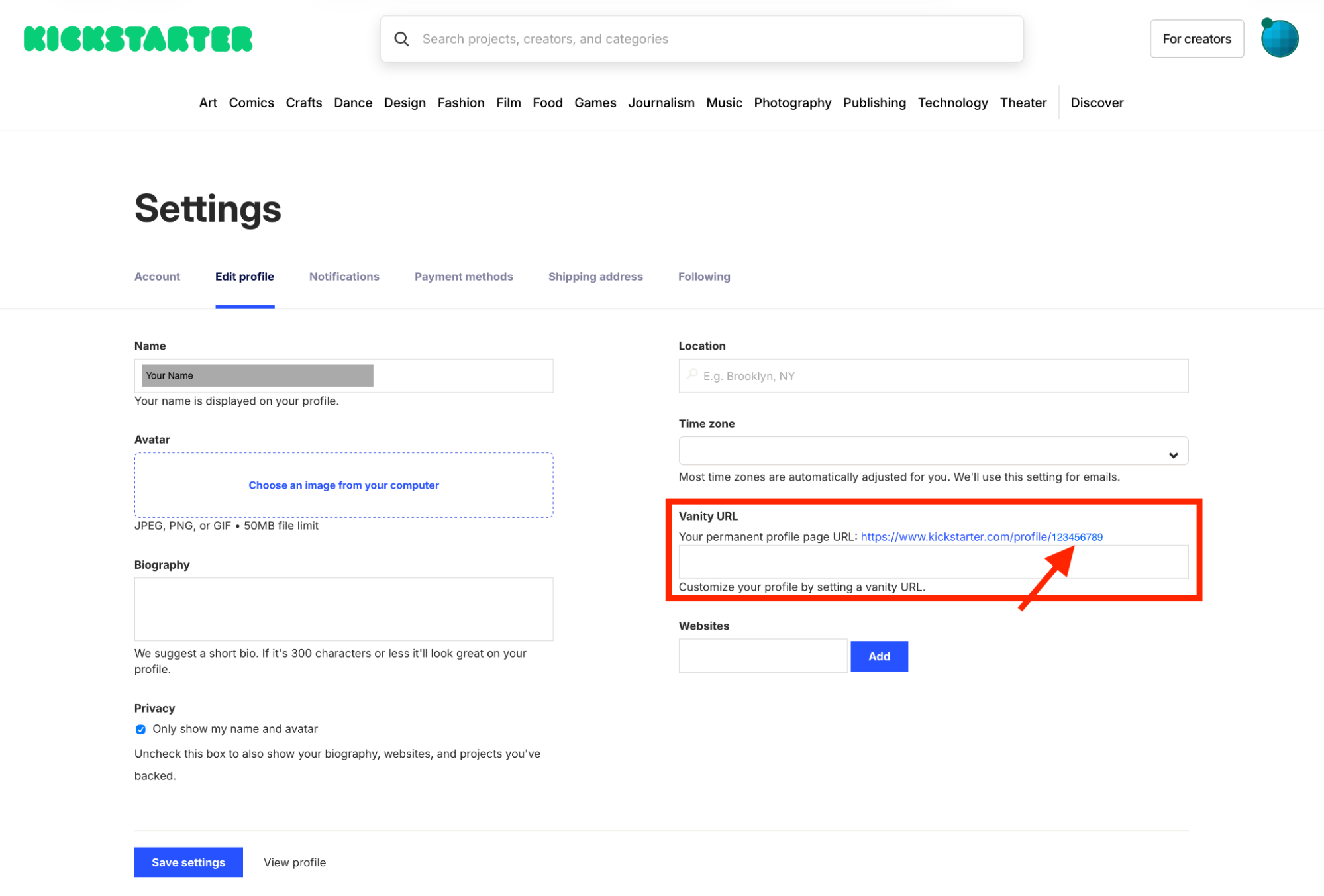
- You will see your Backer ID/ Kickstarter account # there:
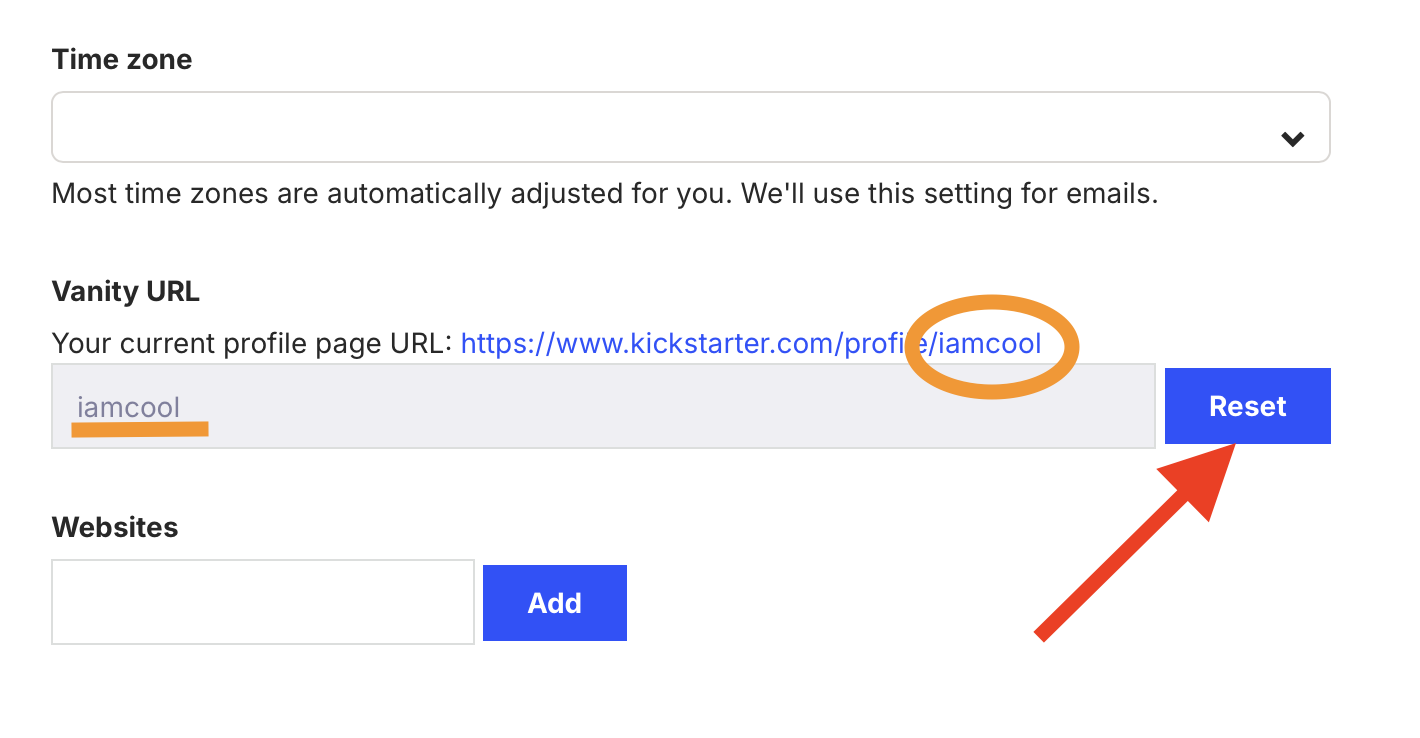
- After you copy your Backer ID/ Kickstarter account #, you can put your vanity URL again.
These pages and the Backer ID/ Kickstarter account # is not visible in the Kickstarter mobile app. If you’re on a phone or tablet, switch to a browser (Safari, Chrome, etc.) to log in. If needed, enable “Request Desktop Site” so you can view the full URL.
SECURITY WARNING: Because this number is tied directly to your account, do not share it publicly. Only provide it inside this redemption form or if requested directly by our support team.
If you've found all the required information, head here to fill out the survey:
Comments
0 comments
Please sign in to leave a comment.